 --> (Word) --> (Word) |  --> (PDF) --> (PDF) |  --> (Epub) --> (Epub) |  --> (Text) --> (Text) |
 --> (XML) --> (XML) |  --> (OpenOffice) --> (OpenOffice) |  --> (XPS) --> (XPS) | |
| This article has been published [fromdate] | |||
| [readtime] | |||
A VBA Project password can be removed with a hex editor (I used the XVI32 Freeware editor from here). Although I didn't discover this method, I'm happy to post the process with screenshots to help others.
Sometimes all we need is that little snippet of code in an old VBA Project we've archived away...Open your chosen workbook file (.xls or .xla file) in the hex editor. It will look like the following;
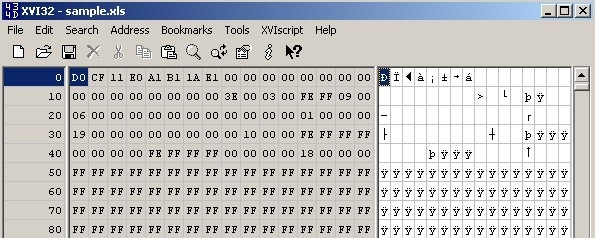
Now search for the Text string "DPB" and change it to "DPx" (simply type over the value).
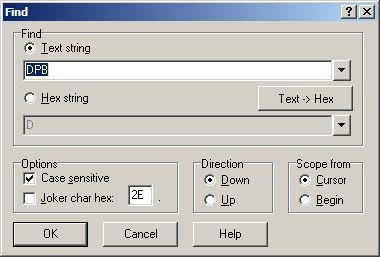
- Save the file over the top of the existing workbook and close.
- Now, open the workbook in Excel and click OK until the [gs workbook] is open (you may receive a couple of VBA errors on the way).
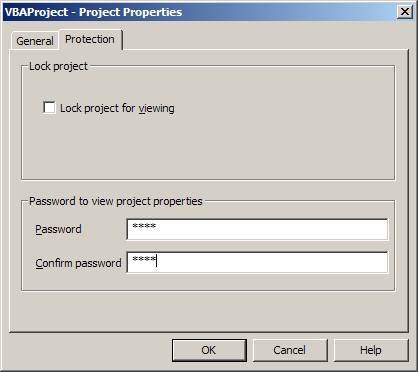
- Press ALT+F11 to open the Visual Basic Project window, from the Tools menu, choose the command VBAProject Properties, navigate to the Protection tab, and change the password but do not remove it (note the new password).
- Save the [gs workbook], close, and re-open.
- Once open, press ALT+F11 and enter the new password.
- Finally, choose Tools -> VBAProject Properties, navigate to the Protection tab, and remove the password.
- Save the workbook.
SOURCE | LINK (Posterous.com)
| LANGUAGE | ENGLISH |
 |  | ||